Snap a receipt — we read the date, vendor and amount
Mouse Snap turns a shoebox of crumpled receipts into clean, categorized, accountant-ready records. Point your camera, and our AI reads every receipt in seconds — then exports a spotless Excel report on demand.
Free plan — no credit card required.
Watch it work
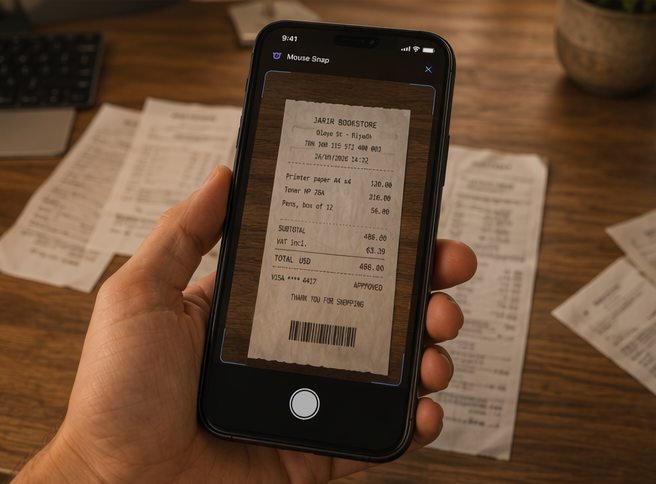
Point your phone at a receipt — Mouse Snap detects the edges, reads the details, and files it in seconds. Here’s the whole flow, start to finish.
- ✓ Auto edge-detection & capture
- ✓ Instant AI extraction
- ✓ Straight into your dashboard
How it works
From photo to filed in three steps.
Snap it
Photograph a receipt or upload a photo — on the web or the Android app.
We read it
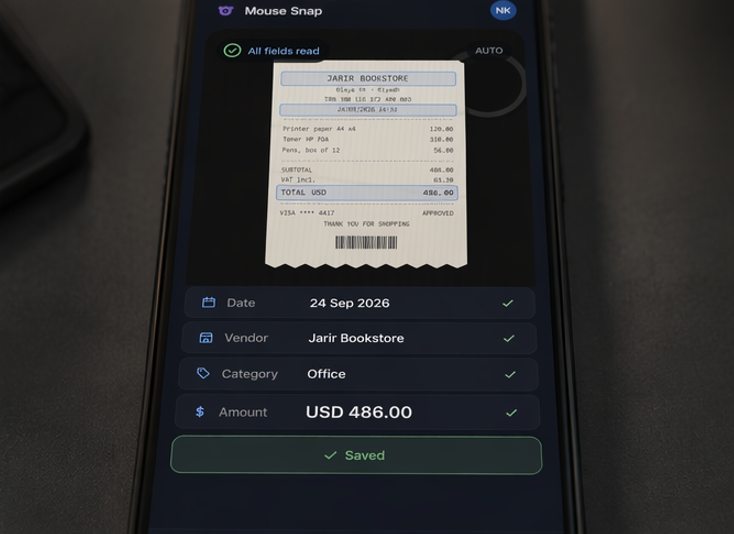
AI extracts the date, vendor, amount and currency in seconds, and suggests a category.
Review & export
Confirm the details, then export a clean, accountant-ready Excel report.
Everything you need to tame receipts
Built for freelancers, small businesses and anyone tired of manual data entry.
Accurate AI extraction
Reads date, vendor, amount, tax and payment method. Anything unclear is flagged for quick manual entry — never guessed.
Multi-currency
Handles 20 currencies — USD, EUR, GBP, SAR, AED and more — with month-end conversion for clean totals.
Smart categories
Automatic category suggestions — Meals, Travel, Groceries, Office and more.
Excel & CSV export
One-tap, accountant-ready workbook (or plain CSV): all receipts plus a monthly summary — on paid plans.
Private by design
Receipt images are processed to extract data and are not stored on our servers.
A closer look
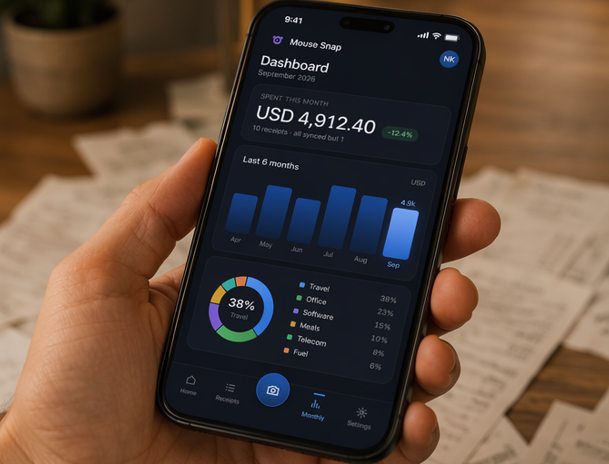
From the receipt in your hand to a clean, categorized record — here’s Mouse Snap in real life.

Take Mouse Snap everywhere
Install it straight to your home screen and snap receipts the moment you get them — the full app, on iPhone and Android, no app store needed.
Simple, transparent pricing
Start free. Upgrade when you scan more. Prices in USD.
Frequently asked questions
What is Mouse Snap?
Mouse Snap is an AI-powered receipt and expense tracker. You photograph a receipt or bill and it automatically reads the key details — date, vendor, amount, tax and currency — suggests a category, and organizes everything into clean, accountant-ready records you can review, report on and export to Excel. It works on the web and on Android, so you can capture on the go and manage on your desk.
How does the AI reading work, and how accurate is it?
Each receipt is read by Anthropic's Claude AI, which handles printed and thermal receipts, multiple layouts and languages, and even faded or slightly crumpled paper. Every field comes back with a confidence level: anything the model isn't sure about is clearly flagged and left blank for you to confirm, so Mouse Snap never silently guesses a number. You always get a quick review step before a receipt is saved.
Do you store my receipt photos?
No. Your receipt image is sent over an encrypted connection, processed only to extract the fields, and is not stored on our servers or used to train third-party AI models. We keep just the extracted data (date, vendor, amount, category and your notes) in your account — which also keeps your storage footprint, and your exposure, to a minimum.
What happens when I reach my monthly scan limit?
Automated scanning simply pauses for the rest of the cycle and we let you know — nothing is lost, and you can still add receipts manually. Your allowance resets at the start of your next billing period (or the calendar month on the Free plan), and if you upgrade, the higher allowance is available immediately.
Can I export my receipts to Excel or CSV?
Yes. Any plan above Free can export a polished Excel workbook — all receipts plus a monthly summary — or a plain CSV, in one tap, ready to hand to your accountant or import into your bookkeeping tool. Pro and VIP plans also get a tax/VAT summary sheet.
Which currencies are supported?
Mouse Snap reads and tracks receipts in 20 currencies (including USD, EUR, GBP, SAR, AED and QAR), automatically detecting the currency on the receipt. Your dashboards and reports are shown in the currency you use most, with month-end conversion for clean, consolidated totals.
Is there a free plan, and can I cancel anytime?
Yes — the Free plan includes 10 scans per month with no credit card required, so you can try Mouse Snap risk-free. Paid plans are billed securely through Paddle, our Merchant of Record, and you can upgrade, downgrade or cancel at any time from your account; access continues until the end of the period you've paid for.
Is there a mobile app?
Yes — an Android app for capturing receipts the moment you get them, fully synced with the web app at mousnap.com. Snap on your phone, then review, report and export from either device.
Get your evenings back
Stop squinting at faded thermal paper. Let Mouse Snap read your receipts for you.